Acer Predator Atlas 8 review
Heavyweight handheld power
This is the Acer Predator Atlas 8, and not only is it one of the most powerful gaming handhelds you can buy right now but it also has a massive eight inch screen that lets you take full advantage of all that horsepower. But, with an unsurprisingly high price, does it do enough to make for a convincing purchase overall? That’s probably going to depend on you.
So, quickly taking a look at what you get in the box, there’s of course the handheld itself, plus unlike Valve with the Steam Frame, Acer does include a charger so you don’t have to rely on already having a 65W rated charger and USB cable. Acer has also thrown in a simple cardboard stand, which is genuinely a quite a useful little extra, and you get a hard carry case too. It’s all as you’d hope for the price of this thing, but it’s nice to see Acer hasn’t scrimped on those little extras.
To the handheld itself then and the single most obvious thing about it is that it is big. Not only does its 8-inch screen make it a large device when viewed from front on, as compared to handhelds with 7-inch screens, like the Steam Deck or Xbox Ally X, but its middle section is significantly thicker too. Well, technically, it’s actually exactly the same thickness as the Xbox Ally X for most of its middle section, but the Ally X has a slightly deeper dip just in front of the grips that makes it feel slightly thinner.
Moreover, the large controller-like grips of the Ally X make it much easier to handle in general but particularly to hold one handed. You know, for those moments where you need to use the touchscreen or gesticulate at the prowess of your opponent. Meanwhile, the Steam Deck’s thinner mid section and steeper grip sides make it easier to hold. If Acer had just cut a slightly deeper groove between the section of the grip and its central section it would’ve made this a lot nicer to hold. I’ve not yet had a chance to try the MSI Claw 8 EX AI+,which is a handheld with nearly identical specs to this device, but it looks to have a slightly better grip design.
Unfortunately, what exacerbates this issue is that the Atlas 8 is a heavy handheld. At 870g, it’s 21% heavier than the Xbox Ally X and 29% heavier than the Steam Deck, and in fact, it’s even heavier than the Lenovo Legion Go that has a larger 8.8-inch screen and detachable controllers. It’s also 85g heavier than the MSI Claw 8 EX AI+ – god that device has a ridiculous name.
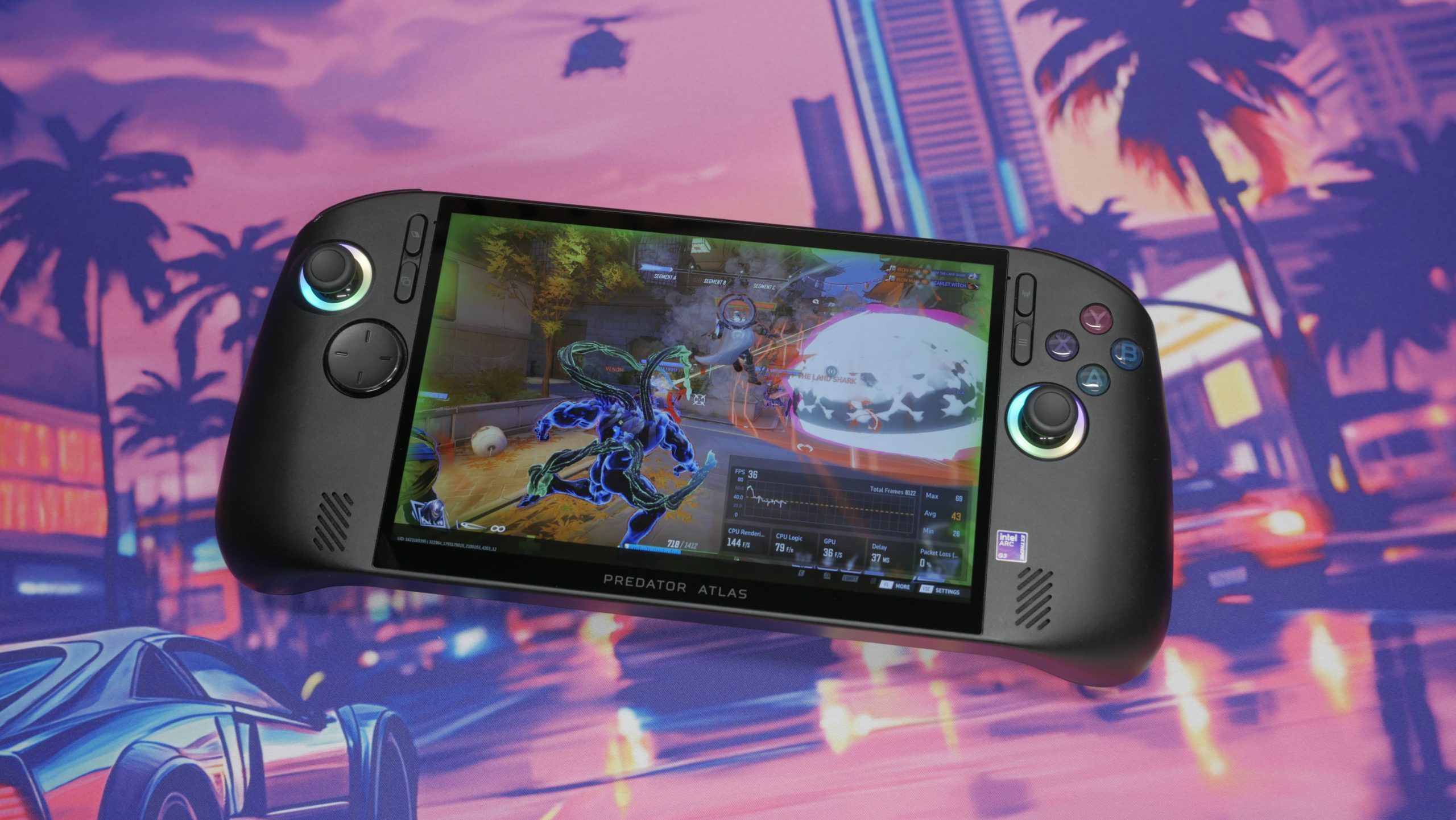
Crucially, this isn’t just an academic difference but I really did feel it in use. It’s still very usable, but every time I went back to using the Ally X or Steam Deck it felt like a relief.
Otherwise, ergonomically, this is mostly a great device. The thumbsticks, face buttons, triggers and bumpers all fall to hand really easily and feel good. You even get dual mode triggers, with a sliding switch on the back for each one. These let you alternate between a long throw for analog input or a shorter throw for quicker response. The short throw doesn’t use microswitches, like on some controllers, but they do genuinely feel a bit quicker to use. However, I did notice that some games – such as Doom the dark ages – didn’t recognise the shorter throw option, so I had to use the triggers in long throw mode.
The D-pad could also be a little bit of a stretch for some people, as the bulge of this grip section gets in the way of your hand a bit. Its buttons also feel a tad mushy and less distinct than those of the Ally X, for instance. Overall, though, it is still perfeclty useable.
Along with the standard face buttons, you get the main menu button in the top left, which brings up the standard settings overlay that’s part of the Xbox full screen experience. Then, below this is the standard Xbox controller View button and on the opposite side is the Xbox menu button, with the Predator Sense button above that. This brings up Acer’s full settings interface for the device that includes options for things like performance modes, graphics settings, calibration for the inbuilt gyroscope, audio profiles, and lighting effects. Finally, round the back there are a couple of programmable macro buttons.
Like most handhelds these days, all the connectivity is along its top edge, and you get two thunderbolt 4 ports for charging or connecting to a dock, volume controls, lights to indicate charging and whether the RGB lighting is on, a microSD slot, headphone jack, and the power button.
Mostly there’s not much to say about that lot. However, I found the volume controls constantly got in the way when I picked this thing up, making me inadvertently turn the volume up. The Xbox Ally X suffers from the same problem, but it’s not as bad. The volume buttons are more pronounced on that device so you notice them more when you grab it, plus they’re not quite as easy to press. The extra grip force you need to pick up the heavier Atlas 8 also exacerbates this issue.
The lighting I mentioned a moment ago consists of the two RGB ring lights around the thumbsticks and the Acer Predator logo on the back. They look nice enough I suppose, but you’ll probably want to turn them off to minimise distraction and maximise battery life.
For sound, there are a couple of speakers firing out the front, and they seem like they should offer a decently powerful, bassy sound. However, the audio profiles Acer provides don’t seem to make the most of that potential. The Gaming profile is muffled and boomy, the Music one is shrill, and they all lack the clarity of the Ally X’s speakers, for instance. They’re still fine for casual gaming and watching youtube videos at low volume, but at the very least, it’s a silly slip up for Acer to have not included a flat EQ option. Even worse, though, is that those sound profiles are also on when using headphones, so you can’t escape them. There might be a way to manually disable the profiles, but it shouldn’t be needed. Hopefully it’s something Acer tweaks with a future update.
As for the screen, well, this is the second biggest selling point of a this device, as it’s fantastic. All jokes aside, one inch can make all the difference, and it has a huge impact on the experience of using this device compared to a 7-inch screen like on the Steam Deck. Not only is it larger overall, making images more impactful, text more readable, and icons more usable, but it’s a taller aspect ratio, so this screen feels more practical to use with the desktop and any other interactions outside of gaming or watching video. Specifically, you get a 1920 x 1200 pixel resolution, compared to the 1920 x 1080 screen of the Ally X or of course the much lower resolution 1280 x 800 screen of the Steam Deck.
The impact of this screen difference will to some extent depend on your eyesight. If you’re young or shortsighted, you might not mind using a smaller sharper screen really close to your face, but for my aging eyes and those with slight longsightedness, this feels like a much more comfortable viewing experience overall.
The quality of the screen is great too. It’s just a standard IPS LCD, with no multi backlight zones, so it can’t compete with OLED or miniLED for black levels and contrast, but it’s bright, delivers punchy colors, and has viewing angles. Watching typical 16:9 aspect ratio videos will mean you get slight grey bars above and below the video, thanks to that taller 16:10 aspect ratio, but it’s far from a deal breaker.
When it comes to the overall interface, I’ve already hinted at the fact that the taller screen makes Windows full desktop mode feel a bit more usable overall than on smaller screen handhelds, but of course most of the time you’ll want to use the xbox full screen experience and this remains as ok as ever. It still feels like it’s lacking in integration of some fundamental system settings, instead needing you to use the Predator Sense interface or jump into the desktop fairly regularly. Plus, unless all your games are on game pass, the experience starts to feel disjointed and clunky quite quickly once you start having to load Steam or other game launchers. If all your games are on Steam and they all work on SteamOS, the Steam Deck is still comfortably the better choice for ease of use.
However, if you do have Game Pass and you like to play games such as Fortnite, Apex legends, Rainbow six siege, or any other titles which have anti cheat that doesn’t work on SteamOS, a Windows handheld is going to be your best bet.
What isn’t dependent on your choice of game launcher, though, is the power of the Atlas 8. It is available in several configurations, but inside this top spec version there’s an Intel Arc G3 Extreme processor – which is the same as in the MSI Claw 8 EX AI+ – and its 12 Xe GPU cores absolutely dominate the performance of older handhelds.
Firing up Marvel Rivals running at 1920 x 1200 with medium detail settings and FSR upscaling set to quality, this thing delivered a just playable 37fps when using its 25W Quiet mode. Meanwhile the 30W Balanced mode saw our frame rate hit 40fps, and the 35W Turbo mode pushed this even higher, to 43fps.
These numbers compare to just 35fps for the Ally X when using its 25W Turbo mode, and even then I noticed more regular frame rate drops. Meanwhile, using the 17W performance mode saw our frame rate drop to just 30fps, and its Slient 13W quiet mode managed just 21fps, and this is while running at a slightly lower 1920 x 1080 resolution.
Meanwhile, in Doom the Dark Ages, running again at 1920 x 1200 with handheld graphics settings and FSR set to balanced, the 35W mode of the Atlas 8 hit 77fps average, and this only dropped to 68fps for the 25W quiet mode.
These numbers compare to just 41fps for the Ally X using its 25W Turbo mode, although it’s worth noting that this is mainly because the ray tracing in Doom the dark ages puts a cap on the performance the Ally X can achieve. If you drop to the 13W Silent mode, you can still get 37fps.
The downside to all that power is in fact the main downside of this thing overall, which is battery life. Although, the situation is more just complicated than outright bad. Use the performance or turbo modes and run at relatively high settings and this thing chews through its battery in an hour and half to two hours, and sometimes less. Crucially, though, switching to quiet mode also doesn’t drop its power usage that much.
However, you can actually set a manual power mode with a range of as low as 10-15W, and this can significantly draw out the battery life. Combine this with a less demanding game or watching video, and you can get upwards of five hours out of this thing. However, that’s still a long way off the five to ten hours of use you’ll get out of the Steam Deck or Ally X.
As such, the overall feel of this device is that it’s much more about offering a great at home portable gaming experience. Fire it up while sat on the sofa or sat up in bed, plug it in, and this thing offers a great experience. It’ll also work well for short commuter travel or for when you get to your destination when travelling. However, as a device to reliably offer hours of distraction while out and about or on longer bus, train, plane journeys, it doesn’t give you that more reliable long life.
Then of course, we come to the price of this thing. Acer does actually offer several variants of the Atlas 8, with the lower spec models starting from $1,099. And in fact, the company is already offering a Black Friday discount that knocks $100 off that price. Plus, here in the UK at least, Acer is bundling a bunch of accessories with the Atlas, including a charger and dock. However, to get the full performance of this model of the Atlas 8, you will have to spend just shy of $1300 or £1300, although again this price has been reduced for Black Friday.
That’s a pretty extreme price, but it is in fact lower than the MSI Claw 8 EX AI+ so this thing is reasonable value for the power that you get. After all, this thing isn’t too far of the performance of the Steam Machine, let alone the Steam Deck.
Whether the extra cost will be worth it to you will probably come down to the types of games you play. If you don’t mind a gaming handheld being mostly for casual, indie, 2D sorts of titles, the likes of the Steam Deck of Asus ROG Ally non X are still the value kings. But, if you want to consistently be able to play AAA titles on the move, this thing is pretty compelling.
But what about you? Have you bought one of these already or are you tempted? Let me know your thoughts in the comments.
Related Posts


About The Author
