Pimax Dream Air SE review
High res, OLED, and ultralight, but with compromises
Enter code “techytalk” at checkout to save 2% on the Pimax Dream Air SE: https://store.pimax.com/products/pimax-dream-air-se?ref=techytalk
Intro
This is the Pimax Dream Air SE, and it’s one of two VR headsets that Pimax makes that are fairly direct price competitors to the Steam Frame, along with the Pimax Crystal Light. It’s available for either $899 or $1199, depending on the configuration you get, and, like the Steam Frame, it’s a compact, lightweight headset. However, unlike Valve’s latest, it’s not a standalone wireless headset, but instead relies on a permanent wired connection to your PC for all its pixel pushing.
What it lacks in wireless freedom, though, it hopes to make up for with much better image quality than the Steam Frame. Not only does it boast higher resolution displays but they’re OLED instead of LCD, which should mean lower black levels and higher contrast. Also, unlike the Bigscreen Beyond 2, which uses the same displays as the Dream Air SE and costs a similar amount for its base configuration but otherwise is a completely barebones headset, this headset can be bought as a fully featured one. For $1199, you can get a version with inside out tracking and controllers, and both versions of this headset also include speakers built into the arms.
Opt for the cheaper $899 version and you lose the controllers and inside out tracking, so you will need to buy or already have at least two tracking lighthouses and a pair of controllers. But, this makes it a potentially ideal upgrade from a Valve Index, for instance. For this review, though, I’m testing the more expensive option with the inside out tracking and included controllers.
Design and comfort
Looking more closely at this headset, then, and it really is impressively compact, with a smaller front optical section than the Steam Frame, and effectively no extra weight at the back. It also comes in at well under 200g, and even though you get a bit of extra weight from the cable, the overall weight is still far lower than the Steam Frame’s 440g.
This doesn’t necessarily result in a much more comfortable headset, though. In fact, the original face gasket that Pimax shipped with this thing was so bad, the company rushed to bring out a new one to include with new purchases and send to existing buyers. Sadly, this new one does slightly let down the sleak look of this headset, but it is a vast improvement in terms of comfort, and has benefits for the optics of this headset too.
Nonetheless, it’s still not perfect. On my head, I found this extended top section of padding largely didn’t provide much benefit as the angle it sits at means it leaves a gap along its top edge where the padding isn’t actually touching my head. This then leaves the bottom edge of the padding taking all the force making the gasket slightly press into the ridge of my brow. Pimax could do with either having this section be slightly less rigid, so it can conform to your face, or with the padding being just a few millimetres thicker.
Otherwise, though, because the headset is so light, there’s very little that’s outright irritating when wearing this headset for long periods of time.
As for the strap, it’s a bit of a hassle to setup and adjust, as it has no stretch in it, so you have to loosen it, don the headset then tighten the straps, hoping not to snag your hair in the velcro. Once adjusted to your liking, though, you can leave it set and just slide the headset on and off.
A notable bonus is that the rigid arms of the headband make it easier to pick up and set down than the floppy elastic bands of the Steam Frame. These arms also then incorporate the headset’s speakers, bringing them closer to your ears than with headsets where the speakers are mounted in the front section. And, sure enough, this means this headset has much better sound than the Steam Frame. Bass is deeper and the sense of immersion is better, plus there’s much less sound leakage.
The cable protrudes from both arms of the headset, making it a little more awkward to put on than headsets where the cable comes from a single point, but it’s not a major concern. Plus, the cable is slightly thinner and lighter than some VR headset cables, making it generally not too distracting.
This headset also does a notably better job than the Steam Frame, and in fact many VR headsets, of blocking light from creeping in around your nose. For me, it completely blocked any light leakage, which really helps with immersion.
However, rather ironically, this new face gasket is made of a material that’s just translucent enough that if you’re in a bright room, you can see a slight glow coming through the plastic.
Also, a crucial thing to note when it comes to comfort is this headset has absolutely no room for glasses. Not only will normal frames not fit in the face gasket, but there’s not even enough depth between the lenses and your eyes to fit normal glasses lenses. Instead, you will have to get custom prescription lenses for this headset.
Also, it’s worth noting that custom lenses for this headset can’t then be used with the non SE version of the Dream Air, if you’re tempted to upgrade at a later date.
Features
In terms of other features, this version of the headset includes inside out SLAM tracking, for which there are four cameras in the front. These then also provide a pass through view, which it has to be said, is pretty terrible quality. It’s a good thing this is a wired PCVR headset, as you would not want to use these cameras for navigating your way around your house. The tracking also relies on external light so doesn’t work in complete darkness.
On headset controls consist of an interface button and volume, and that’s your lot. These can also be used to perform room setup in Pimax’s software if, for instance, you’re using the headset without its controllers.
Setup and software
Setting up the Dream Air SE is quick and easy, with just a DisplayPort on your graphics card needed, along with a decently fast USB 3.0 port. Once plugged in, just install Pimax’s software and you’ll be up and running. You do need to run this software every time you use the headset, but it’s fairly unobtrusive, and although earlier versions of Pimax software were notoriously flaky, I’ve generally found it to be very reliable.
In the software you’ll find settings for controller vibration intensity and calibration, tracking lighting options, IPD adjustment, and eye tracking. The latter can be used to enable foveated rendering in games that support it. However, I’ve left it off for most of this testing, as I not only prefer to not use eye tracked foveated rendering, but it messes with trying to capture footage of the headset with a normal camera.
You can also setup different audio outputs and change the display brightness and refresh rate.
Under the image section, you can adjust the headset’s internal quality control as well as engage the static foveated rendering, which essentially reduces the quality of a game’s image towards the edges of the lens. Unlike dynamic foveated rendering, this doesn’t rely on eye tracking but simply keeps the rendering quality fixed across the field of view of the lenses.
Controllers
The included controllers are a classic shape and layout and are decently comfortable and worked well in terms of tracking accuracy. The only thing of note is they only have finger recognition through camera tracking and the triggers, so multi finger tracking isn’t very good. Also, the triggers have quite a light action to them.
Image quality
So to image quality, then, and it’s a mixed bag. For a start, you might have spotted that the maximum refresh rate of these displays is just 72Hz, which again matches the Bigscreen Beyond 2, but is well below the 90Hz or 120Hz that is typical for many alternatives.
However, I didn’t overly find this to be a problem. If you can get your PC to run a game at a consistent 72Hz, this still offers a decently smooth experience.
Unfortunately, though, this display has another big issue when it comes to speed of movement, which is image retention. Move your head quickly and there’s a really obvious smeared motion blur effect, which is a result of the headset cranking up the OLED display to try and get the maximum brightness out of it.
Now, this can look really bad, in terms of being noticeable when you think to look for it, but actually, again I didn’t necessarily find it affected my enjoyment of games, even those with relatively fast motion. I could still play Beat Saber perfectly well and enjoyed my time zipping around the skies in MS flight sim.
Nonetheless, it’s less than ideal.
On the plus side, the fact that these are OLED panels does get you great black levels and high contrast. However, this contrast isn’t always as impactful as you might expect, for a couple of reasons. For a start, the maximum brightness of the panels just isn’t that high, so you don’t really get the contrasting dazzle of a bright sky against a dark background. Also, there’s a fairly noticeable amount of internal reflections in the lenses whenever there’s a strong amount of brightness off to the side of your view, and this can create a hazy cast over dark areas of the image.
Perhaps the biggest limitation of all, though, is the tiny size of the lenses and the limited FoV they provide. The lenses here are so small that the headset is ultra sensitive to how close you can get your eyes to them. As such, even with this improved face gasket, I couldn’t get anywhere near the claimed 105 degree FoV of this headset. Instead, I got a mere 86 degrees. This improves ever so slightly if you really push the headset onto your face, but this isn’t comfortable to do, doesn’t improve things much, and this was already meant to be the gasket that improved this headset’s FoV.
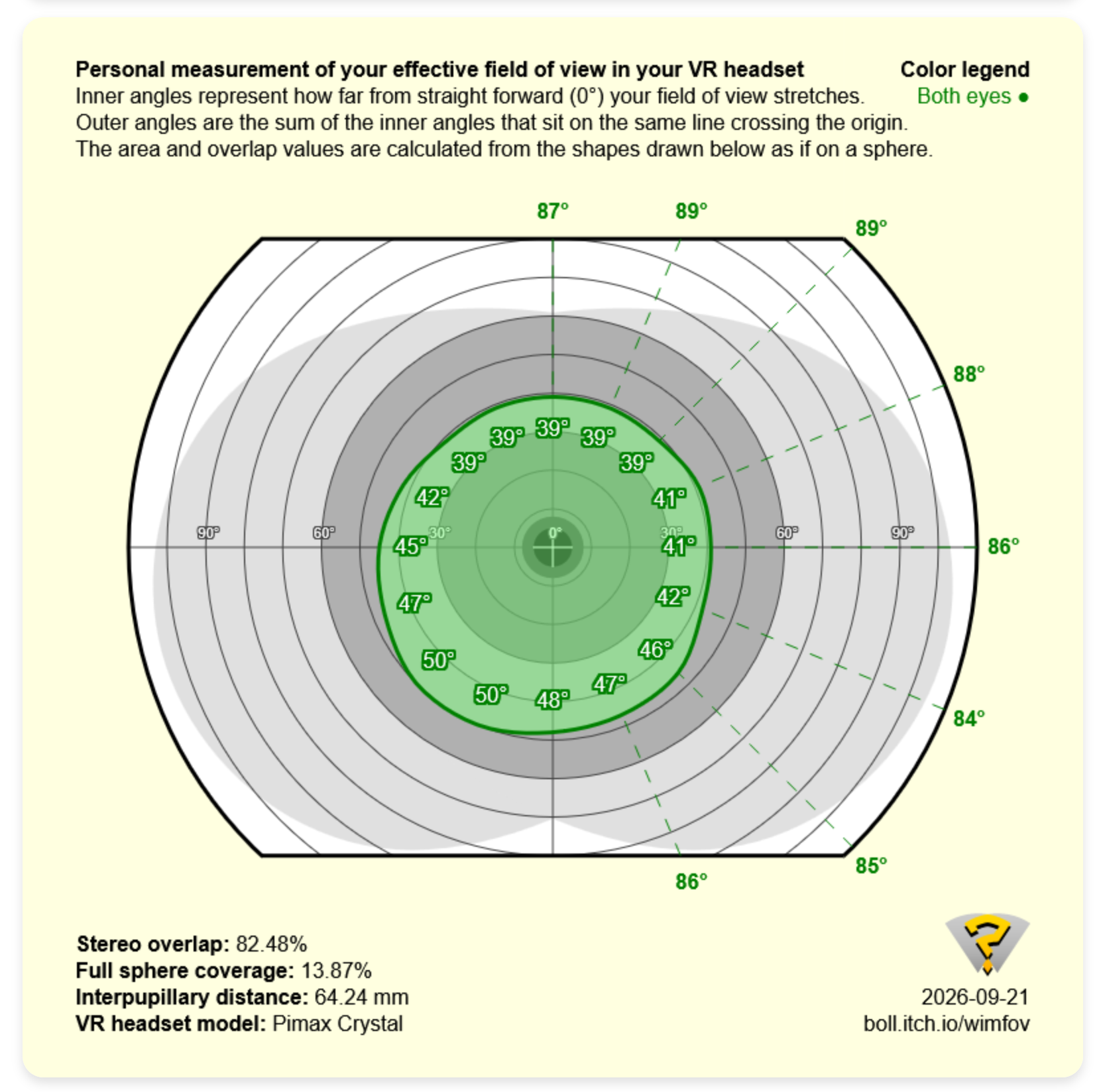
This is all the more of a shame as it means that the view you get feels so restricted that you hardly notice the benefit of the decently sharp 2560×2560 resolution of these displays. Technically the sharpness is there, but there are just too many other distractions.
Verdict
As such, this all adds up to a headset that’s a hard sell. As a standalone option, there are just too many compromises for me to recommend this over the Steam Frame. Yes, the Frame has its own downsides when it comes to image quality, but it’s brighter, has a much better FoV, and it runs at a much faster refresh rate. Add in all the extra features you get and, as an upgrade from a Meta Quest 3 or older standalone option, the Frame is clearly the better choice.
If, however, you have a Valve Index or similar setup with base stations and controllers, and you’re just looking for a straight upgrade to the visuals of your headset, well then the Dream Air SE has some potential. The headset only version is comfortably cheaper than the Steam Frame, and technically does have a higher resolution and that OLED contrast. However, its success still will almost entirely come down to how well it fits you in terms of it naturally giving you a good field of view. It’s potentially worth a try, as your face shape may just work better with it, and perhaps an after market face gasket will unlock its image quality, but those factors aside, it’s not an option I can recommend for most right now.
Instead, if you’re really looking for a massive image quality upgrade over the Steam Frame for even less money, and you don’t mind using a larger headset, the Pimax Crystal Light is the top alternative I’d recommend right now.
Related Posts


About The Author
